How to Fully Optimize Your Google Business Profile in Dallas Texas: Ultimate Guide
If you want your Dallas business to stand out online, your Google Business Profile is your secret weapon. When fully optimized, it can attract more local customers, boost your search rankings, and turn curious browsers into loyal clients.
But how do you make sure your profile isn’t just there, but working hard for you? You’ll discover simple, effective steps to unlock the full power of your Google Business Profile right here in Dallas, Texas. Get ready to take control of your online presence and watch your business grow like never before.
Claim And Verify Your Profile
Claiming and verifying your Google Business Profile is the first step to managing your online presence in Dallas, Texas. This process helps you control how your business appears in Google Search and Maps. It also builds trust with local customers by showing accurate information. A verified profile means Google recognizes your business as real and trustworthy, which is crucial for GBP optimization.
Without claiming and verifying, someone else might edit your business details. You won’t get access to important tools that help you connect with customers. Follow clear steps to claim your business and verify it properly.
Steps To Claim Your Business
Go to the Google Business Profile website and sign in with your Google account to optimize Google Business. Enter your business name and address to search for your business. If your business appears, select it. If not, add a new business listing with correct details.
Choose the category that best fits your business. Add a phone number and website if available. Double-check all information for accuracy. Submit your request to claim the profile. Google will guide you through the next steps.
Verification Methods For Dallas Businesses
Google offers several ways to verify your business in Dallas. The most common method is by mail. Google sends a postcard with a verification code to your business address. Enter the code online to complete verification.
Phone verification is available for some businesses. Google calls with a code you enter online. Email verification may be an option if Google already has your business email on file. Instant verification works if you already use Google Search Console for your website.
Choose the method that fits your business best. Verification ensures your business details are protected and accurate. It opens access to tools that improve your local search presence.
Complete Your Business Information
Completing your business information on Google Business Profile helps customers find
you easily. It builds trust and shows your business is active, which is essential for google business profile optimization. Filling out every detail increases your chances of appearing in local searches.
Accurate and complete information guides potential clients to visit or contact your business. It also helps Google understand your services better. Make sure all details are clear and correct for the best results in your google maps visibility.
Accurate Contact Details
Provide your exact phone number, email, and website address. Double-check these details for any errors. Use a local Dallas phone number to improve local search visibility. Avoid using call centers or forwarding numbers. Customers want to reach you quickly and directly.
Business Hours And Special Hours
List your regular business hours clearly. Update special hours for holidays or events ahead of time. This prevents confusion and missed visits. Accurate hours help Google show your business at the right time, improving your chances of showing up in local search. Customers appreciate knowing when you are open.
Category Selection Tips
Choose primary and secondary categories that match your business closely. Use specific categories instead of broad ones. For example, select "Dallas Mexican Restaurant" rather than just "Restaurant." Accurate categories improve your chances of appearing in relevant searches. Review and update categories regularly as your business evolves.
Add High-quality Photos And Videos
Adding high-quality photos and videos to your Google Business Profile makes your listing more attractive. Visual content helps potential customers see what your business offers. It builds trust and invites people to visit or contact you. In Dallas, where competition is strong, good visuals stand out.
Choose clear, bright images that show your business in the best light for effective GBP optimization. Videos should be short and focused on key points. Both photos and videos must load quickly and display well on phones and computers.
Types Of Photos To Include
Start with your business exterior. Show your building and signage to help customers recognize your business categories. This helps customers find you easily.
Next, add interior photos. Show clean, inviting spaces where customers spend time. Include your products or services in action.
Employee photos add a personal touch, enhancing your optimized profile and attracting more customers. Show your team at work or ready to help.
Customer photos with permission build social proof. Show happy clients enjoying your services.
Don’t forget special events or promotions. These photos highlight what makes your business unique in Dallas.
Video Content Ideas For Engagement
Introduce your business with a short welcome video. Speak clearly and keep it under one minute.
Show how your products work or how you deliver your services. Demonstrations help customers understand your value.
Share customer testimonials. Real people talking about your business create trust.
Take viewers on a quick tour of your location. It makes your business feel familiar and inviting.
Highlight any special offers or events. Use videos to grab attention fast.
Write A Compelling Business Description
Writing a strong business description is key to a great Google Business Profile. It tells people what your business is about. It helps them decide if your services fit their needs. A clear and engaging description also boosts your profile's visibility in search results.
Crafting A Clear And Concise Description
Start by stating what your business does in simple words. Use short sentences to explain your main products or services. Avoid jargon or complex terms that confuse readers. Focus on what makes your business different and valuable to enhance your business categories and attract customers. Keep the description under 750 characters to stay clear and direct.
Incorporating Local Keywords
Include words that show your connection to Dallas, Texas. Use terms people search for in your area. Add neighborhood names, landmarks, or local events if relevant. These keywords help your profile appear in local searches. Use them naturally to keep the description easy to read.
Manage And Respond To Reviews
Managing and responding to reviews is a key part of your Google Business Profile. It helps build trust and shows that you care about customers. Reviews give potential clients a peek into your business quality and service. Active management keeps your profile fresh and engaging.
Encouraging Customer Reviews
Ask customers kindly to leave a review after a purchase or visit. Make it easy by sharing a direct link to your Google Business Profile. Remind them that their feedback helps improve your service. Positive reviews attract more local clients in Dallas Texas. A steady flow of reviews boosts your profile’s ranking.
Best Practices For Responding
Reply to reviews quickly, within a day or two. Thank customers for positive feedback to show appreciation. For negative reviews, stay calm and polite. Address the issue and offer a solution or invite them to discuss privately. Avoid arguing or ignoring bad reviews to maintain your business's reputation and improve showing up in local search. Your responses reflect your business’s professionalism and care.
Utilize Google Posts For Updates
Google Posts offer a direct way to share news and updates on your Google Business Profile, helping to optimize Google Business. Regular posts keep your Dallas business fresh in the eyes of searchers. They also help communicate important details quickly. Use this tool to highlight events, offers, and new products. Engaging posts attract more views and potential customers.
Types Of Posts To Share
Share updates about special offers and discounts to attract more attention to your optimized profile. Promote upcoming events or workshops. Announce new products or services. Post about company news or changes in hours. Use images or videos to make posts eye-catching. Clear, simple text works best for quick understanding.
Scheduling And Frequency
Post regularly to keep your profile active. Aim for one to two posts per week. Avoid long gaps between updates to keep your audience engaged and maintain an optimized Google Business Profile. Schedule posts ahead for consistent activity. Timely posts about sales or events boost visibility and can be part of ways to optimize your Google Business Profile. Consistency helps your profile rank better in local searches.
Leverage Q&a Section Effectively
The Q&A section on your Google Business Profile is a valuable tool. It allows potential customers to ask questions about your business. Answering these questions clearly builds trust and shows you care. This section also helps other users find quick answers, saving time and improving their experience.
Using the Q&A section well can improve your profile’s visibility in Dallas. It highlights important details about your services, hours, and policies. Actively managing this section keeps your information accurate and up to date.
Common Questions To Address
Start by listing typical questions customers ask to enhance your optimized Google Business Profile optimization. Include topics like business hours, parking options, and payment methods. Add details about your products or services, such as availability or special features, to enhance your google business listing. Clear answers help users decide to visit or call your business.
Think about questions customers often ask in person or on phone calls. Adding these to the Q&A section saves time for both you and your customers. Keep answers simple and direct to avoid confusion, which can help improve your local ranking.
Monitoring And Managing Responses
Check the Q&A section regularly to respond quickly. Timely replies show you value customer input and care about their needs. Remove any spam or irrelevant questions to keep the section useful.
Encourage your team to watch this area daily. Respond with polite, helpful answers. This active management boosts your profile’s credibility and encourages more engagement.
Optimize For Local Seo In Dallas
Optimizing your Google Business Profile for local SEO in Dallas helps your business appear in local search results. It connects your business with people near you. Local SEO increases your chances of being found by Dallas customers ready to buy. Focus on specific tactics to boost your visibility in this area.
Using Dallas-specific Keywords
Choose keywords that mention Dallas or nearby neighborhoods. Include terms like “Dallas,” “Downtown Dallas,” or “North Dallas” in your business description. Use these keywords naturally in your posts and updates to help your business rank higher in local search. This tells Google your business is relevant to Dallas searches. Avoid stuffing keywords; keep the text clear and simple.
Building Local Citations And Backlinks
Create local citations by listing your business on Dallas directories and review sites. Examples include the Dallas Chamber of Commerce or local business groups. Get backlinks from Dallas blogs, news sites, or community pages. These links boost your profile’s trust and authority. Always keep your name, address, and phone number consistent across all listings.
Monitor Insights And Analytics
Monitoring insights and analytics is essential for any Google Business Profile in Dallas Texas. It shows how people find and interact with your profile. This information helps you understand what works and what does not, allowing you to optimize your google business listing.
Regularly checking these insights lets you see customer actions, search queries, and profile views. These details guide your decisions to improve your profile’s performance. Without tracking data, it is hard to know if your efforts pay off and whether you are ranking higher in local search results.
Tracking Profile Performance
Google Business Profile offers many metrics to track. You can see the number of views, clicks, and calls from your profile. It also shows how users find your business, like through direct searches or discovery.
Tracking these numbers over time using Google Analytics reveals trends that can inform your optimization strategies. You might notice more people visit your profile after posting updates, which can help you rank higher in local search. Or, fewer calls during certain months. This data helps you spot strong points and areas needing work.
Adjusting Strategies Based On Data
Data from insights guides your marketing choices, providing signals to google that can improve your local ranking. For example, if many users search for a specific service, highlight it on your profile. If calls drop, try adding a new photo or updating your hours to improve your google maps visibility.
Testing different strategies and watching results helps improve your profile and optimize Google Business effectively. Adjust your posts, offers, or business description based on what the data says. This approach keeps your profile relevant and engaging for Dallas customers.
Maintain And Update Your Profile Regularly
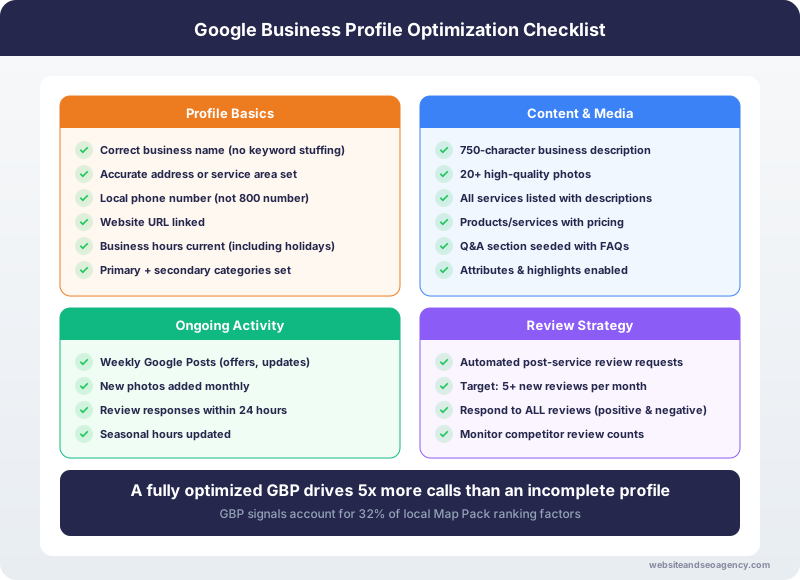
Maintaining and updating your Google Business Profile regularly helps keep your Dallas business visible and trustworthy. Search engines and customers prefer profiles with fresh and accurate details. Active profiles improve local search rankings and attract more potential clients. Regular updates show that your business is active and ready to serve.
Keeping Information Current
Check your business name, address, and phone number often. Make sure these details match your website and other listings. Update your hours of operation for holidays or special days. Remove old phone numbers or locations that no longer exist. Accurate information helps customers find and contact you easily. It also prevents negative reviews caused by wrong details.
Seasonal And Event-based Updates
Use your profile to announce sales, events, or seasonal offers. Change your cover photo or add posts about current promotions. Highlight special hours during holidays or local festivals in Dallas. Adding event details keeps customers informed and interested. It encourages more visits and builds community trust around your brand.
Frequently Asked Questions
How Do I Claim My Google Business Profile In Dallas?
To claim your Google Business Profile, visit Google My Business. Verify your business by phone or mail. This secures control and allows updates to your Dallas business info.
What Are Key Optimization Tips For Google Business Profile?
Optimize your profile by adding accurate contact info, business hours, and high-quality photos. Use relevant keywords in your description. Encourage customer reviews to boost your Dallas business visibility and improve your google review ratings.
How Often Should I Update My Google Business Profile?
Regularly update your profile to keep information current. Update photos, offers, and hours seasonally or during special events. Frequent updates improve your Dallas business’s search ranking and user trust, contributing to effective engine optimization.
Why Are Customer Reviews Important For My Profile?
Customer reviews build trust and influence search rankings. Responding to reviews shows engagement and improves your Dallas business reputation. Encourage satisfied customers to leave positive feedback.
Conclusion
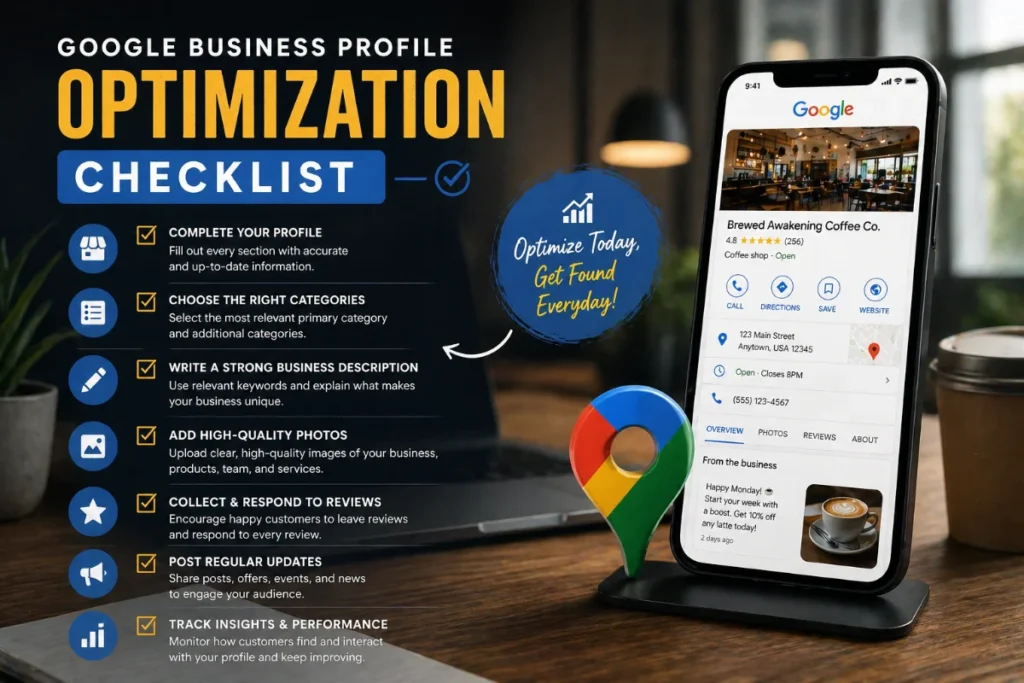
Optimizing your Google Business Profile helps people find your Dallas business. Keep your information accurate and updated often. Add photos and respond to reviews to build trust. Use keywords that show what you offer clearly. Regular updates keep your profile active and relevant.
These steps make your business stand out locally. Start today to reach more customers nearby. Success grows with small, steady improvements.